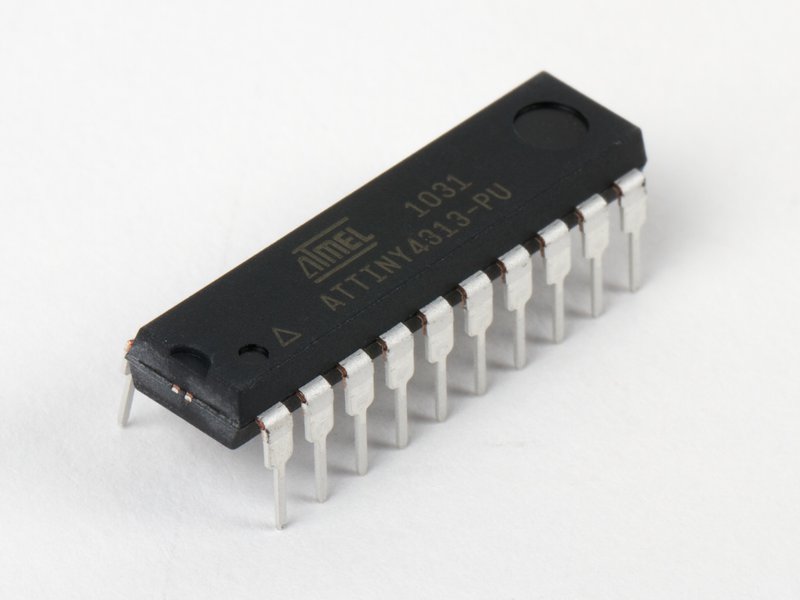
Part 2: Programming in assembler
Why?
I need to get rid of that library and gain control of the entire CPU. So my idea is to rewrite the all code ... in assembly (or assembler).
A quick note here: I did program in assembly over 30 years ago, at University (8085, 68000) as well as for personnal projects (6502, 6809, 8086, a little bit of Z80). But since then, I turned to other languages, mostly to C/C++. So my assembly skills are a little bit rusty.
Pros and cons
- Assembly is simple: programming in assembly is like playing with Lego (which I did a lot!). It consists of assembling small block (operational codes, or opcodes) together. This is why it's called ... assembly! Each opcode does a very limited operation, well described in the datasheet.
- Nothing is hidden: no library, no help, you'll have to write everything from scratch. Not totally true, since we can find some headers files online, which I used.
- The datasheet is the reference: it contains everything, even some examples in assembly.
- The lack of documentation problem: mainly because it is used by a minority, and several toolsets exist, you cannot count on finding a quick answer when an problem arises. Actually, you are mostly on your own.
Also, most of the doc online is outdated. However, the ATTiny4313/2313 datasheet is the reference source of information, as well as the Avr Instruction Set manual. Finally, I found some valuable information in avr-libc documentation. - Syntax is not consistent: since there are several assembler (the compilator), each one has its own implementation, hence slight differences on the syntax. I use avr-gcc.
- Assembly is not portable: true, but in my case, not an issue. Also, the opcodes are coherent between all avr-based chips.
Some notes
- Contrary to all CPU I used in the past, ATTiny is based on Harvard architecture where code and data are separated.
- The interrupt vectors are located between 0x000 and 0x0014. If a vector is not used, the memory can be re-used for code.
The tools
I have installed:
avr-gcc(documentation)$ avr-gcc --version avr-gcc (GCC) 5.4.0
avr-asAKAgas(GNU Assembler)$ avr-as --version GNU assembler (GNU Binutils) 2.26.20160125
simulavr$ simulavr --version SimulAVR 1.2dev
$ dmesg | grep tty
[320448.786051] cdc_acm 5-2:1.0: ttyACM0: USB ACM device
$ export USBDEVICE=/dev/ttyACM0
The Makefile
.PHONY: \
	vars \
	help \
	clean \
	compile \
	dump \
	upload \
	simul \
	fuses \
	check-fuses

# Hack to get the directory this makefile is in:
MKFILE_PATH	:= $(lastword $(MAKEFILE_LIST))
MKFILE_DIR	:= $(notdir $(patsubst %/,%,$(dir $(MKFILE_PATH))))
MKFILE_ABSDIR	:= $(abspath $(MKFILE_DIR))
AVR_PATH	:= /snap/arduino/85/hardware/tools/avr
AVR_BIN_PATH	:= $(AVR_PATH)/bin

# Hack to get all *.h files into compile dependencies:
HEADERS		= $(shell find $(MKFILE_DIR) -name "*.h")

BUILDTMP	?= $(MKFILE_DIR)/build-tmp
OPTIMIZATION	?= -Os
AVRAS		?= $(AVR_BIN_PATH)/avr-as -Wall -al -v --listing-rhs-width=80 -mmcu=$(DEVICE) -I$(MKFILE_DIR)
AVRGCC		?= $(AVR_BIN_PATH)/avr-gcc -Wall -nostartfiles -mmcu=$(DEVICE) -I$(MKFILE_DIR)
AVRCC		?= $(AVRGCC)
AVRDUDE		?= $(AVR_BIN_PATH)/avrdude
LD		?= ld
#---------------------------------------------------------
# AVRDUDE_FLASHARG:
# This preserves the chip memory when updating the fuses.
# To erase the chip when setting fuses, do:
#
#     make AVRDUDE_FLASHARG=-e fuses
#
AVRDUDE_FLASHARG ?= -D
#---------------------------------------------------------
AVR_SIZE	?= $(AVR_BIN_PATH)/avr-size
AVR_OBJCOPY	?= $(AVR_BIN_PATH)/avr-objcopy
AVR_OBJDUMP	?= $(AVR_BIN_PATH)/avr-objdump
DEVICE		:= attiny4313
ARCHITECTURE	:= "avr:25"
CLOCK		:= 8000000L
PROGRAMMER	:= stk500v1
BAUD		:= 19200
SRC		:= blink.S
OBJ		:= $(BUILDTMP)/$(SRC:S=o)
ELF		:= $(BUILDTMP)/$(SRC:S=elf)
HEX		:= $(BUILDTMP)/$(SRC:S=hex)
EEP		:= $(BUILDTMP)/$(SRC:S=eep)
FUSE_EXT	:= 0xff
FUSE_HIGH	:= 0x9f
FUSE_LOW	:= 0xcf
AVRDUDE_CONF    := $(AVR_PATH)/etc/avrdude.conf
AVRDUDE_OPTS    := -C $(AVRDUDE_CONF) -p$(DEVICE) -c$(PROGRAMMER) -P$(USBDEVICE) -b$(BAUD)
USBDEVICE	:= $(shell dmesg | awk '/tty/ {gsub(/:/,"",$$4);A=$$4} END{print "/dev/"A}')

# Misc target info:
help_spacing  := 12

.DEFAULT_GOAL := compile

#---------------------------------------------------------
# Ensure temp directories.
#
# In order to ensure temp dirs exit, we include a file
# that doesn't exist, with a target declared as PHONY
# (above), and then have the target create our tmp dirs.
#---------------------------------------
-include ensure-tmp
ensure-tmp:
	@mkdir -p $(BUILDTMP)

vars: ## Print relevant environment vars
	@printf  "%-20.20s%s\n"  "MKFILE_PATH:" "$(MKFILE_PATH)"
	@printf  "%-20.20s%s\n"  "MKFILE_DIR:" "$(MKFILE_DIR)"
	@printf  "%-20.20s%s\n"  "MKFILE_ABSDIR:" "$(MKFILE_ABSDIR)"
	@printf  "%-20.20s%s\n"  "BUILDTMP:" "$(BUILDTMP)"
	@printf  "%-20.20s%s\n"  "OPTIMIZATION:" "$(OPTIMIZATION)"
	@printf  "%-20.20s%s\n"  "AVRAS:" "$(AVRAS)"
	@printf  "%-20.20s%s\n"  "AVRGCC:" "$(AVRGCC)"
	@printf  "%-20.20s%s\n"  "AVRCC:" "$(AVRCC)"
	@printf  "%-20.20s%s\n"  "AVRDUDE:" "$(AVRDUDE)"
	@printf  "%-20.20s%s\n"  "AVRDUDE_OPTS:" "$(AVRDUDE_OPTS)"
	@printf  "%-20.20s%s\n"  "AVR_SIZE:" "$(AVR_SIZE)"
	@printf  "%-20.20s%s\n"  "AVR_OBJCOPY:" "$(AVR_OBJCOPY)"
	@printf  "%-20.20s%s\n"  "AVR_OBJDUMP:" "$(AVR_OBJDUMP)"
	@printf  "%-20.20s%s\n"  "DEVICE:" "$(DEVICE)"
	@printf  "%-20.20s%s\n"  "CLOCK:" "$(CLOCK)"
	@printf  "%-20.20s%s\n"  "PROGRAMMER:" "$(PROGRAMMER)"
	@printf  "%-20.20s%s\n"  "USBDEVICE:" "$(USBDEVICE)"
	@printf  "%-20.20s%s\n"  "BAUD:" "$(BAUD)"
	@printf  "%-20.20s%s\n"  "SRC:" "$(SRC)"
	@printf  "%-20.20s%s\n"  "ELF:" "$(ELF)"
	@printf  "%-20.20s%s\n"  "EEP:" "$(EEP)"
	@printf  "%-20.20s%s\n"  "HEX:" "$(HEX)"

help: ## Print this makefile help menu
	@echo "TARGETS:"
	@grep '^[a-z_\-]\{1,\}:.*##' $(MAKEFILE_LIST) \
		| sed 's/^\([a-z_\-]\{1,\}\): *\(.*[^ ]\) *## *\(.*\)/\1:\t\3 (\2)/g' \
		| sed 's/^\([a-z_\-]\{1,\}\): *## *\(.*\)/\1:\t\2/g' \
		| awk '{$$1 = sprintf("%-$(help_spacing)s", $$1)} 1' \
		| sed 's/^/  /'
	@printf "\nUsage:\n make \\\n %s \\\n %s \\\n %s \\\n %s\n" \
		"USBDEVICE=/dev/cu.usbserial-1234" \
		"SRC=my_source.c" \
		"DEVICE=%lt;mcu>" \
		"%lt;make target>"

vpath %.o $(BUILDTMP)
vpath %.eep $(BUILDTMP)
vpath %.elf $(BUILDTMP)
vpath %.hex $(BUILDTMP)

$(OBJ): $(SRC)
	$(AVRAS) -mmcu=$(DEVICE) -o $@ $%lt;
$(ELF): $(OBJ)
	$(AVRGCC) -mmcu=$(DEVICE) -L$(BUILDTMP) $(LDFLAGS) -o $@ $%lt;
$(HEX): $(ELF)
	$(AVR_OBJCOPY) -O ihex -R .eeprom --preserve-dates $%lt; $@
	$(AVR_OBJDUMP) --architecture=$(ARCHITECTURE) -D $@
$(EEP): $(ELF)
	$(AVR_OBJCOPY) -O ihex -j .eeprom --set-section-flags=.eeprom=alloc,load --no-change-warnings --change-section-lma=.eeprom=0 --preserve-dates $%lt; $@

clean: ## Clean build artifacts
	rm -rf $(BUILDTMP)/*
	rm -vf *.s

compile: $(EEP) $(HEX)
	$(AVR_SIZE) -A $(ELF)

link: compile ## Link compilation artifacts and package for upload

upload: $(HEX)	 ## Upload (NOTE: USBDEVICE must be set)
ifndef USBDEVICE
	$(error 'USBDEVICE not defined! Please set USBDEVICE env var!')
endif # USBDEVICE
	$(AVRDUDE) -v $(AVRDUDE_OPTS) -Uflash:w:$(HEX):i

fuses: ## Flash the fuses
ifndef USBDEVICE
	$(error 'USBDEVICE not defined! Please set USBDEVICE env var!')
endif # USBDEVICE
	$(AVRDUDE) -v $(AVRDUDE_OPTS) -D \
	    -Uefuse:w:$(FUSE_EXT):m \
	    -Uhfuse:w:$(FUSE_HIGH):m \
	    -Ulfuse:w:$(FUSE_LOW):m

check-fuses: ## Verify device signature and check fuse values
	$(AVRDUDE) $(AVRDUDE_OPTS)

simul: $(ELF)
	simulavr -d attiny2313 -t attiny2313 -f $(ELF)

mo4: mo4.S  tn4313def.h attiny4313_registers.h
	avr-gcc -mmcu=attiny4313 $^

dump: $(HEX)
	@echo "Dump of Flash"
	$(AVRDUDE) $(AVRDUDE_OPTS) -U flash:r:$(MKFILE_DIR)/flash.bin:r
	@$(AVR_OBJDUMP) --architecture=$(ARCHITECTURE) --demangle --disassemble --source --wide $(MKFILE_DIR)/flash.bin
Blink in assembly
#include "tn4313def.h"	; I found this header file on Internet; it is mostly correct.

; *******************************************************************************************
; Macros
; *******************************************************************************************
; These macros fixes the address shift between I/O and registers

; When using the I/O specific commands IN and OUT, the I/O addresses 0x00 - 0x3F must be used.
; When addressing I/O Registers as data space using LD and ST instructions, 0x20 must be added to these addresses.

.macro  STORE addr,reg
.if     \addr < 0x60
 out    \addr,\reg
.else
 sts    \addr + 0x20,\reg
.endif
.endm

.macro  LOAD reg,addr
.if     \addr < 0x60
 in     \reg,\addr
.else
 lds    \reg + 0x20,\addr
.endif
.endm

;	Calculate the delay value
.equ	CLOCK_FREQ,	8000000		; 8 MHz
.equ	PRESCALER,	1024		; / 1024
.equ	DELAY_VALUE, (CLOCK_FREQ / (2 * PRESCALER)) / 16

; We use a 10 LED bargraph. MIDI_LED must flash every time LOOP_LED changes states. CTRL_LED is the control LED (always ON)
.equ	MIDI_LED, PIND6		; Timer 1 (compare with OCR1A)
.equ	LOOP_LED, PIND4		; Software loop
.equ	CTRL_LED, PIND0

.equ	V17,	0x01

.text
Reset:          rjmp main
INT0addr:       rjmp Reset
INT1addr:       rjmp Reset
ICP1addr:       rjmp Reset
OC1Aaddr:       rjmp OC1Aaddr_routine
OVF1addr:       rjmp Reset
;
; Starting from this address, it's not necessary to declare the interrupt vectors
; since I don't use them. I can start the program here. However, since I have enough
; program memory (4K - 40 bytes - stack), I prefer to declare the vectors. They all go
; to Reset, hence to main.
;
OVF0addr:       rjmp Reset
URXCaddr:       rjmp Reset
UDREaddr:       rjmp Reset
UTXCaddr:       rjmp Reset
ACIaddr:        rjmp Reset
PCIBaddr:       rjmp Reset
OC1Baddr:       rjmp Reset
OC0Aaddr:       rjmp Reset
OC0Baddr:       rjmp Reset
USI_STARTaddr:  rjmp Reset
USI_OVFaddr:    rjmp Reset
ERDYaddr:       rjmp Reset
WDTaddr:        rjmp Reset
PCIAaddr:       rjmp Reset
PCIDaddr:       rjmp Reset

; =========================================================
; Main routine
; =========================================================
main:   cli                      ; disable interrupts
        ldi     r16, lo8(RAMEND) ; Set stack pointer to end of ram
        STORE   SPL, r16
        ;ldi    r16, hi8(RAMEND) ; SPH doesn't exist on this CPU
        ;STORE  SPH, r16

        ldi     r16, (1<<PUD) ; Disable Pull-Up resistors globally
        STORE   MCUCR,r16         ; Update the MCU Control Register

        ; We select the pins of Port D that must be set as outputs
        ldi     r16, (1<<MIDI_LED)|(1<<LOOP_LED)|(1<<CTRL_LED)
        STORE   DDRD, r16         ; ... and set the data direction of port B to "out"

; ---------------------------------
; Configure Timer 1
; ---------------------------------
; Configure Timer/Counter 1 to mode 4 (CTC) and prescaler / 1024
;       TOP value = OCR1A
;TOV1 Flag Set on = MAX
;          |   7  |   6  |   5  |   4  |   3  |   2  |   1  |   0  |
;          +------+------+------+------+------+------+------+------+
; TCCR1A = |COM1A1|COM1A0|COM1B1|COM1B0|   -  |   -  | WGM11| WGM10|
;          |   0  |   0  |   0  |   0  |   0  |   0  |   0  |   0  |
; TCCR1B = |ICNC1 |ICES1 |   -  | WGM13| WGM12| CS12 | CS11 | CS10 |
;          |   0  |   0  |   0  |   0  |   1  |   1  |   0  |   1  | = mode 4, prescaler /1024
; TCCR1C = |FOC1A |FOC1B |   -  |  -   |   -  |   -  |   -  |   -  |
;          |   0  |   0  |   0  |   0  |   0  |   0  |   0  |   0  |

		ldi	r16, hi8(DELAY_VALUE)	; Prepare the values for OCR1A
        ldi	r17, lo8(DELAY_VALUE)
Very important here: 16 bits registers must be loaded high byte first. Otherwise, only the lowest byte is loaded, leading to unexpected results
; WRONG, NOT WHAT YOU'D EXPECT
;       STORE OCR1AL, r16		<--- lowest byte will be loaded
;       STORE OCR1AH, r17		<--- but not the highest byte; OCR1A contains 0x00FF not 0xFFFF.

; This is the good way
        STORE OCR1AH, r16 ; High byte must be written first ...
        STORE OCR1AL, r17 ; .. when setting a 16 bits register.

; Configure the Timer/Counter 1 Control Registers
        clr   r16
        STORE TCCR1A, r16
        STORE TCCR1C, r16
        ldi   r16,(1<<WGM12)|(1<<CS10)|(1<<CS12)      ; Set CS10 and CS12 for prescaler of 1024
        STORE TCCR1B, r16
; Configure the OCF1A Interrupt Mask Register
        LOAD  r16, TIFR
        ldi   r16, (1<<OCIF1A)
        STORE TIFR, r16
; Configure the Timer/Counter Interrupt Mask Register
        ldi   r16, (1<<OCIE1A)
        STORE TIMSK, r16

        sei            ; Set Global Interrupt Enable
; ---------------------------------
; Starting the show
; ---------------------------------
        ; Light on the Control LED
        ldi     r16, (1<<CTRL_LED)|(1<<LOOP_LED)
        STORE   PORTD,  r16

oloop:	; outer loop
    	ldi  r17, V17  ; Initialize our software counter
    	ldi  r18, 0xff ; Initialize our software counter
        ldi  r19, 0xff ; Initialize our software counter
iloop:	; inner loop
    	dec  r17       ; decrement r20
    	brne iloop
    	ldi  r17, V17  ; reset r20
    	dec  r18       ; decrement r21
    	brne iloop
    	ldi  r17, V17  ; reset r20
    	ldi  r18, 0xff ; reset r21
    	dec  r19       ; decrement r22
    	brne iloop

        ldi   r23, (1<<LOOP_LED)
        rcall toggle   ; Toggle the LOOP LED

        rcall start_timer
        rjmp  oloop    ; Restart the loop

; =========================================================
; Sub-routines
; =========================================================
toggle:		; Toggle the LED in register r23
        LOAD r16, PORTD  ; Load content of Port D
        eor  r16, r23    ; Exclusive OR to toggle the bit
        STORE PORTD, r16 ; Write Port D
        ret
start_timer:
; Disable interrupts
        cli
; Reset the TCNT1 counter
        clr   r16
        clr   r17
        STORE TCNT1H, r16
        STORE TCNT1L, r17
; Set prescaler = 1024
        LOAD  r16, TCCR1B
        ldi   r16, (1<<WGM12)|(1<<CS10)|(1<<CS12)
        STORE TCCR1B, r16
; Light the MIDI LED on
        LOAD  r16, PORTD
        sbr   r16, (1<<MIDI_LED)
        STORE PORTD, r16
; Enable interrupts
        sei
        ret

stop_timer:
; Set prescaler = 0 -> stop the timer
        LOAD  r16,  TCCR1B
        ldi   r16,  (1<<WGM12)
        STORE TCCR1B, r16
; Light the MIDI LED off
        LOAD  r16,   PORTD
        cbr   r16,   (1<<MIDI_LED)
        STORE PORTD, r16
        ret

; =========================================================
; Interrupt Service Routine (ISR)
; =========================================================
OC1Aaddr_routine: ; Timer 1: interrupt when TCNT1 = OCR1A
        cli              ; Disable interrupt
        rcall stop_timer
        sei              ; Enable interrupt
        reti             ; Return from ISR
Compiling and uploading
make && make uploadAnd yes, it blinks!
Comments